
EZCast Pro Box Quick Start Guide
安装说明
硬体安装
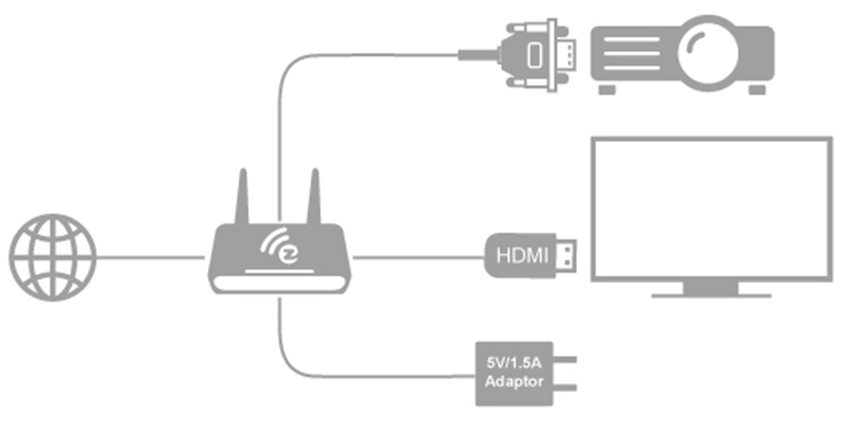
包装盒内附有一条HDMI线与USB转接器,使用5V-1.5A直流电源适配器供电开启EZCastPro Box,使用HDMI或VGA线连接到您的电视或投影机。同时,我们建议您使用RJ-45端口连接路由器,以简化安装过程,并获得稳定的连接。
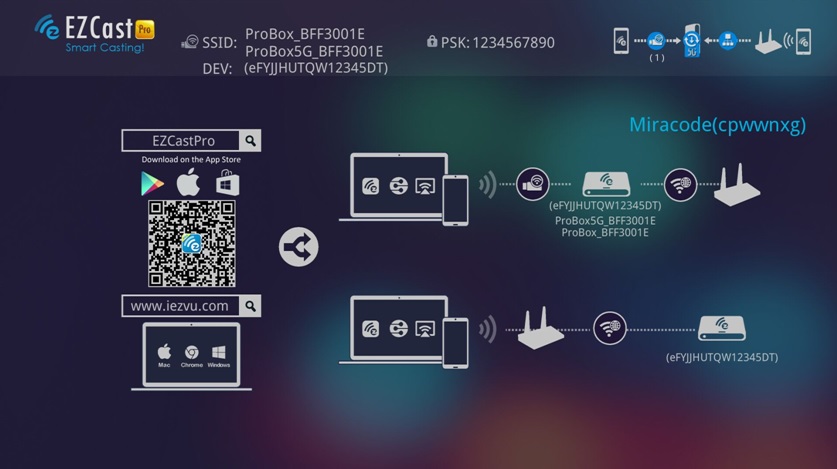
开机画面,从上面可以获知的信息
1.无线局域网的名字:ProBox_xxxxxxxx,密码:xxxxxxxx
Installation
Hardware Installation
There will be an HDMI cable and USB adapter inside of the box, use the 5V-1.5A DC adapter to power up EZCastPro Box, and plug HDMI or VGA cable to your TV or Projector. We also suggest connect RJ-45 port with your router to simplify setup procedures and get stable connection.
You will see connection instruction on screen.
1.The WiFi SSID: ProBox_xxxxxxxx, Password: xxxxxxxx
2.The download address for Windows and Mac OS
3.Download app for iOS platform. You can also search EZCast Pro in AppStore.
4.Download app for Android platform. You can also search EZCast Pro in Google Play.

Download EZLauncher User Manual (Windows, macOS)
Download full user manual
Download 2.0 User Manual (Android, iOS, macOS, Windows)

Download Quick Start Guide